
Dive into electrophysiology data exploration
Explore electrophysiology datasets using in-depth metadata. When searching for an appropriate dataset on EBRAINS with the aim of enriching analyses, building a computational model, training a machine learning algorithm, creating tutorials or research tools designed to link different types of neuroscience or brain-related data, finding this dataset can be challenging. A simple search offers significantly limited options. The abundance of metadata, with well-detailed information about the experimental and analysis protocol associated with the data, contributes to increased findability of suitable datasets.
To improve findability, we offer self-guided exploration tools that facilitate deep exploration of datasets associated with in-depth metadata, with the aim of promoting their reuse for various purposes. You will therefore be able to visualize metadata from the experimental protocol for each subject, data in graph form, as well as data within analysis pipelines, including advance case studies on data reuse.
The EBRAINS Knowledge Graph provides structured and linked metadata to facilitate data reuse, based on the openMINDS metadata framework. The data curation workflow enables the annotation of datasets with basic and in-depth metadata. Basic metadata are general information such as author names, date of publication, number of subjects, species, whereas in-depth metadata are contextual and specific information describing experimental protocols and data analysis adding context to the dataset. The latter significantly improves dataset comprehension and facilitates effective data reuse using different in-depth metadata categories.
The Quick Try, Closer Look, and Deep Dive sections guide you through the Neural Activity Resource (NAR) app, a web app for electrophysiology dataset exploration via in-depth metadata. Each section showcases concrete examples of how in-depth metadata can be used to choose and compare datasets, explore datafiles and reuse datafiles in an efficient manner using linked resources.
Who is this for?
- Students looking for datasets and advanced case studies to combine and to validate their data, and/or advanced case studies to be inspired by new analysis approaches
- Researchers looking to efficiently develop teaching materials using specialized datasets accessible only through advanced filtering
- Researchers requiring larger datasets to enhance the robustness of their study
- Clinicians conducting a retrospective study
What you can do
- Visualizing complex datasets, and leveraging the in-depth metadata for better comprehension
- Effortlessly browse data file contents from similar experimental techniques without downloading the selected datasets.
- Investigate datasets through advanced case studies using in-depth metadata of EBRAINS datasets, demonstrating the advantages of data reuse for creating complex and sophisticated analyses.
- Facilitate meta-analysis
Try it yourself
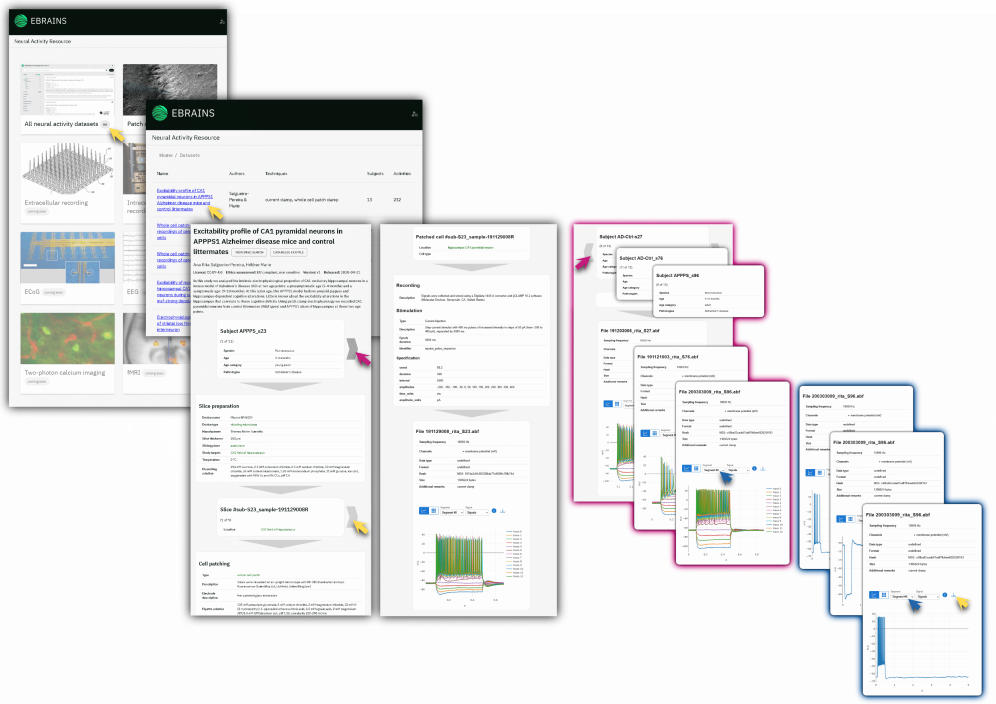
- Through your EBRAINS account, you can access EBRAINS tools and apps such as the Neural Activity Resource (NAR) App (https://nar.apps.ebrains.eu/). This app provides a visualization of detailed, in-depth metadata for each subject of each dataset, enabling users to analyze experimental protocols, visualize the data in graph representation when possible, or match data files to figures in publications.
- Explore: Find a whole cell patch clamp recording dataset by choosing a dataset in the “All neural activity datasets” space and explore the dataset by familiarizing yourself with the in-depth metadata of the subjects and brain slices. Data obtained with various experimental approaches are available in the NAR App. In this exploration we focus on electrophysiology recordings (patch-clamp recordings, extracellular recordings). Since it is actively updated, check the app regularly to explore more datasets.
- Select and interpret: Review the subjects by focusing on pathologies to understand the protocol applied for each condition. A dynamic list of in-depth metadata organized by the principal experimental steps will help you answer questions as “did they inject the same current amplitude for all cells?” or “What subject are they referring to when they say ‘[...] certain subjects received [...]’?”
- Compare: To compare the data files without downloading them, browse the file section. Explore each segment and each signal to view the traces from the data file for each subject. Download the file of interest directly via the NAR app by using EBRAINS Data Proxy.
- Go further: Each dataset visualization on the NAR app links to its entry in the EBRAINS Knowledge Graph Search, where you can find more datasets from the same authors by clicking on their names, or find additional information as related publications, the data descriptor, and other related resources.
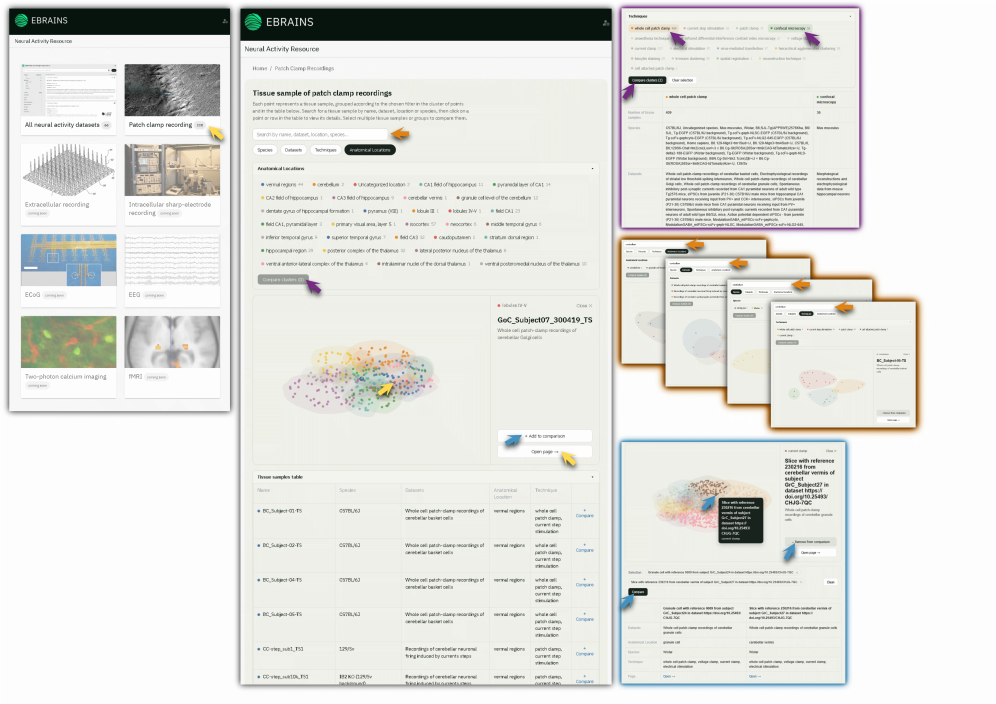
EBRAINS provides many datasets with enriched, in-depth metadata, with the aim of promoting data reuse. To facilitate the understanding of shared data, the NAR app (https://nar.apps.ebrains.eu/) provides a flexible exploration tool, specific to each experimental approach, which makes it easy to explore and compare datasets from the perspective of individual tissue samples (e.g., brain slices, recorded neurons). In future, more comprehensive visualizations will be provided to efficiently select recordings.
- Explore: Click on the experimental approach of interest. A page with a cluster of points representing tissue samples will appear with different filters (species, dataset, technique, anatomical location). Select the filter of interest to cluster the tissue samples of all datasets accordingly. Explore the list of tissue samples in the dynamic table below the cluster visualisation.
- Select and interpret: Open additional details of each tissue sample using the dynamic cluster or table section by clicking on the open page button. The NAR app enables you to understand a dataset from different angles and from different starting points.
- Compare: Choose one or more clusters by simply clicking on the category name to add them to the compare cluster section. Once the cluster of interest is selected, create a comparison table using the “compare clusters” button. This table provides a summary of in-depth metadata linked to each cluster. You can also compare selected tissue samples by adding tissue sample points to a comparison section at the end of the page.
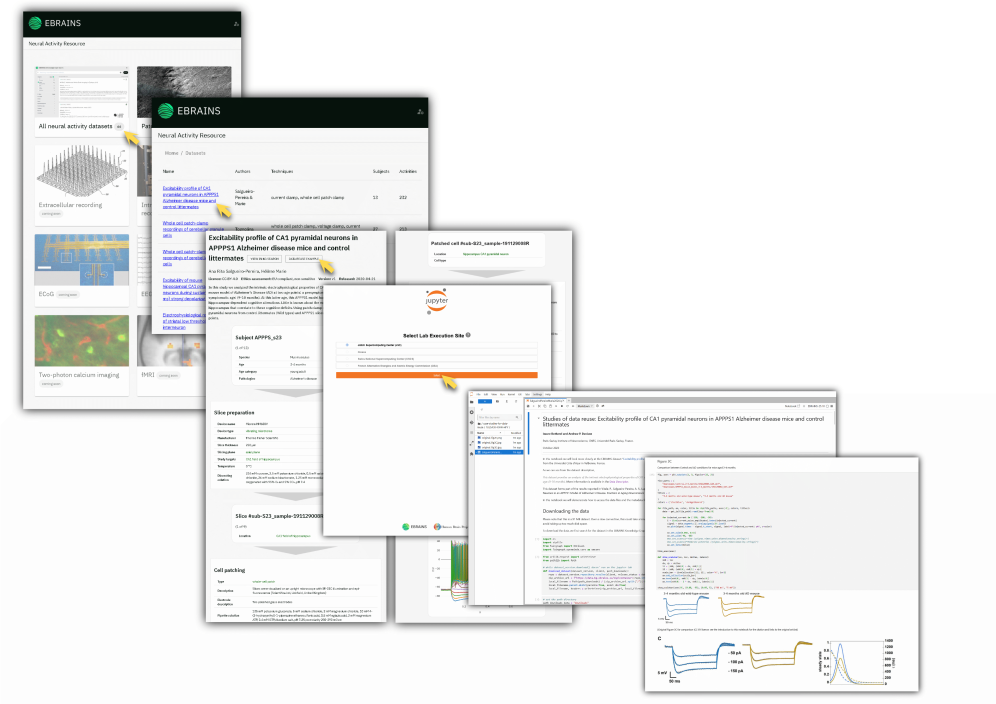
- Select: Select the dataset of interest using the NAR app (https://nar.apps.ebrains.eu/). By clicking on the “data reuse example” button, a Jupyter notebook running in the EBRAINS Lab will lead you to an example of data reuse for this dataset. Reuse may take the form, for instance, of reproducing a figure from a publication related to the dataset, or of a meta-analysis.
- Reproduce: Execute each cell of the Jupyter notebook by following the explanations. Python libraries specifically used for electrophysiological data analysis should be already installed. In most cases, Neo and PyNWB are used to extract the relevant information, and fairgraph is used for communication with the EBRAINS Knowledge Graph.
- Reuse: One aim of these data reuse examples is to promote the reuse of data to promote the emergence of new perspectives. Create tutorials, implement models, explore more similar datasets, or explore other EBRAINS tools using a well-known dataset.
Tools used
EBRAINS Lab - Data reuse examples, mostly Jupyter notebooks that can be run directly in Jupyter Lab.
Fairgraph – A Python library for handling EBRAINS Knowledge Graph metadata objects based on the openMINDS schemas.
Neo Viewer — the service behind the embedded electrophysiology viewer. It reads recordings in any format supported by Neo and exposes them over a REST API as JSON, so a reader can plot traces in the browser without downloading the file.
[Neural Activity Resource app] (https://nar.apps.ebrains.eu) – a web app for visualizing in-depth metadata of electrophysiology data, for comparing datasets, tissue, samples, and recordings based on in-depth metadata.
Create an account
EBRAINS is open and free. Sign up now for complete access to our tools and services.