QUINT workflow

Extract, quantify and analyse features from rodent histological images


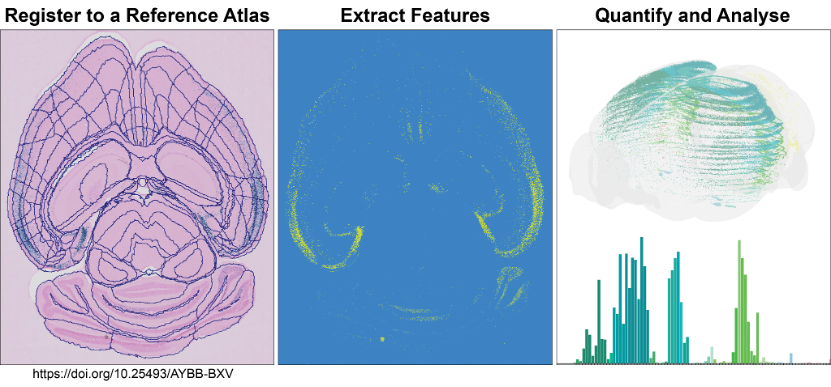
The QUINT workflow takes you through steps to quantify and analyse labelled features within a known atlas space.

  • Leverage a streamlined, tested workflow for analysing labelled features in large numbers of histological sections from mouse or rat
  • Obtain quantitative measures in atlas-defined regions
  • Customise the granularity of regions-of-interest to fit the needs of your analysis

The QUINT workflow comprises a suite of software designed to support atlas-based quantification. All the software have user interfaces, with no coding ability required. It generates object counts and percentage coverage per atlas-region, in addition to point clouds for visualising the features in 3D.

It currently supports quantification relative to the following atlases:

  • Allen Mouse Brain Atlas Common Coordinate Framework version 3 (2015 and 2017) (CCFv3)
  • Waxholm Atlas of the Sprague Dawley rat, version 2, 3 and 4 (WHS rat brain atlas).
QUINT Workflow


Analyse large amounts of histological image data from rat or mouse brains

Nutil
ilastik
QuickNII
VisuAlign
MeshView
QCAlign


Use QUINT for:

  • Cell count analysis
  • Analysis of tract-tracing connections
  • Resizing, rotating and renaming large Tiff images

Access a QUINT dataset on EBRAINS
Use Nutil to edit large Tiff images


Get involved in the QUINT community

Are you interested in atlas based spatial quantification? Discover the QUINT workflow and interact with us to customise the workflow for your needs: Count cells, AD plaques and quantify connectivity traces in 2D images from mice and rat. The QUINT workflow is highly flexible and has developed over time in response to users’ needs. We look forward to continuing this collaboration with the research community and welcome all requests, big and small. Post us questions directly through github or at https://ebrains.eu/support/
 

Github Nutil/ QUINT
Github QuickNII/VisuAlign
Github ilastik
Course Neuroscience data integration

QUINT community


Create an account

EBRAINS is open and free. Sign up now for complete access to our tools and services.